Showing posts with label AutoLISP. Show all posts

March 22, 2021

ACA: Using AutoLISP to Change the Swing of all Swinging Doors

There was a request to change the "swing angle" of all of the Doors in a file to 30 degrees. Building on code I previously wrote for changing the heights of Doors a given style, I put together a command function in AutoLISP that does that. One thing to know before embarking on this particular task is that while all of the 20 built-in Door Types appear to have a SwingAngle property (I did not check all 20, so do not hold me to that), only five of those types (Single, Double, Double Opposing, Uneven and Uneven Opposing) will accept a change to that property; the other 15 types will throw an error and crash the routine. There are four additional types (Single-Dhung, Double-Dhung, Uneven-Dhung and Communicating) that are in fact swinging Doors, but for some reason were not included when the SwingAngle property was introduced. (See comments at the end of the article for more on that.) The "swing" of these types can be changed using the OpenPercent property; a value of 16 approximates 30 degrees. No change is made to the other 11 types of Doors.

The following code defines a command called DRSW that will change the "swing" of Doors of one of the nine types previously mentioned to 30 degrees/16 percent. That amount is hard-coded, on the assumption that this would be part of a larger automation task meant to run unattended (or that you always wanted the same degree/percent values). Collecting user input would be easy enough to add at the beginning if you want to specify the angle/percent each time you run the program.
(defun C:DRSW (                         ; No arguments.
               /
                iCount                  ; Loop counter [integer].
                iDType                  ; Door Type [integer].
                iMax                    ; Total number of Doors in file [integer].
                iProc                   ; Number of Doors processed [integer].
                objDoor                 ; Door object being processed.
                objDStyle               ; Door Style of the object being processed.
                ss1                     ; All Doors in the file [selection set].
              ) ;_ End arguments and local variables.
  (vl-load-com)
  (setq        ss1 (ssget "_X" '((0 . "AEC_DOOR"))))
  (cond
    ((not ss1)                          ; No Doors in drawing.
     (alert "Drawing file has no Door objects.\nNothing to do!")
    ) ;_ End condition A1.
    (T                                  ; Else, continue.
     (setq iMax          (sslength ss1)
           iCount 0
           iProc  0
     ) ;_ End setq.
     (while (< iCount iMax)
       (setq objDoor    (vlax-ename->vla-object (ssname ss1 iCount))
	     objDStyle	(vlax-get-property objDoor 'Style)
	     iDType	(vlax-get-property objDStyle 'Type)
       ) ;_ End setq.
       (if (or
	     (= iDType 1)               ; Single.
	     (= iDType 2)               ; Double.
	     (= iDType 5)               ; Double Opposing.
	     (= iDType 6)               ; Uneven.
	     (= iDType 8)               ; Uneven Opposing.
	   ) ;_ End or.
	 (progn
	   (vlax-put-property objDoor 'SwingAngle 30)
	   (setq iProc (1+ iProc))
	 ) ;_ End progn.
	 (if (or
	     (= iDType 3)               ; Single-Dhung.
	     (= iDType 4)               ; Double-Dhung.
	     (= iDType 7)               ; Uneven-Dhung.
	     (= iDType 20)              ; Communicating.
	   ) ;_ End or.
	   (progn
	     (vlax-put-property objDoor 'OpenPercent 16)
	     (setq iProc (1+ iProc))
	   ) ;_ End progn.
	 ) ;_ End if.
       ) ;_ End if.
       (setq iCount (1+ iCount))
     ) ;_ End while.
    ) ;_ End condition A2.
  ) ;_ End cond A.
  (prompt
    (strcat
      "\nDRSW function completed:  "
      (itoa iProc)
      " Door(s) of "
      (itoa iCount)
      " total Door(s) processed. "
    ) ;_ End strcat.
  ) ;_ End prompt.
  (prin1)
) ;_ End C:DRSW.

Originally, all Door Types controlled how open they appeared using the Opening percent property on the Properties palette (or its prior equivalent). 100% open for a swinging door meant a 180-degree swing. So a 90-degree swing would be 50%. Some users complained that may make sense to a programmer, but they thought of door swings in terms of degrees, not percentages. So at some point (I do not recall which release), a SwingAngle property was added to Door objects, and, for the five Door types noted above, Swing angle replaced Opening percent on the Properties palette. For those five Door types, the two values are linked - change one and the other changes, too. (That is how I determined that 16% was the right value for 30 degrees - that is the value for OpenPercent that the program shows when the SwingAngle is set to 30.) I have no idea why the three Dhung and the Communicating Door Types were omitted from the change to SwingAngle. Perhaps the original complainants rarely, if ever, used those types and so they were not in the original request. Or maybe the way things were set up in the program, it was easy to make the change for the five types that were changed, but not for the other four. Whatever the reason, things are the way they are, and the code above accommodates that.

November 15, 2019

ACA-AMEP: Edit Property Data Via AutoLISP, Part 3

First article in the series.
Previous article in the series.

In the previous article, we used a while loop to examine each Property Set in the collection of Property Sets attached to the object of interest, comparing each Property Set's Name to the name of the Property Set that holds the Property whose value is to be changed. At this point, there are two possible conditions:
  1. A matching Property Set was found. The value in the Property Set counter variable, iPSet, was set to one more than the number of Property Sets in the collection (variable iPSets).
  2. A matching Property Set was not found. The value in the Property Set counter variable, iPSet, will be equal to the number of Property Sets in the collection (variable iPSets).
(cond    ; Cond A.
  ((= iPSet iPSets)
   ;; If the Property Set is not found after processing all attached property sets, issue prompt.
   (prompt
     (strcat
       "\nProperty Set "
       sPSet
       " not found on object passed to argument obj. "
     ) ;_ End strcat.
   ) ;_ End prompt.
   nil    ; Return nil.
  ) ;_ End condition A1.
  (T    ; Else, continue.
   (setq oProps (vlax-get-property oPSet 'Properties)
          ; Get Properties object of the Property Set.
         iProps (vlax-get-property oProps 'Count)
    ; Get number of Properties in the Property Set.
         iProp  0  ; Initialize Property counter.
   ) ;_ End setq.

   (while (< iProp iProps) ; While unprocessed Properties remain...
     (setq oProp   (vlax-invoke-method oProps 'Item iProp)
    ; Get current Property object.
    sPropNm (vlax-get-property oProp 'Name)
    ; Get Property name.
     ) ;_ End setq.
     (if (= (strcase sPropNm) (strcase sProp))
        ; If target Property found...
       (setq iProp (1+ iProps)) ; ...exit while loop.
       (setq iProp (1+ iProp)) ; ...else, increment Property counter.
     ) ;_ End if.
   ) ;_ End while.

   (cond   ; Cond A2B.
     ((= iProp iProps)
      ;; If the Property is not found after processing all Properties in the Property Set, issue prompt.
      (prompt
        (strcat
          "\nProperty "
          sProp
          " not found in Property Set "
          sPSet
          " attached to the object passed to argument obj. "
        ) ;_ End strcat.
      ) ;_ End prompt.
      nil   ; Return nil.
     ) ;_ End condition A2B1.
     (T    ; Else, update Property value with processed value.
      (setq varPropValOld (vlax-get-property oProp 'Value))

      ***** ADD CODE HERE TO GENERATE THE DESIRED NEW VALUE   *****
      ***** SET VARIABLE sPropValNew to the NEW DESIRED VALUE *****

      (vlax-put-property oProp 'Value sPropValNew)
      sPropValNew   ; Return new string value.
     ) ;_ End condition A2B2.
   ) ;_ End cond A2B.

  ) ;_ End condition A2.
) ;_ End cond A.

Here is what is happening in that code:
  • A cond statement is used to determine which of the two conditions noted above is active. The first test checks to see if iPSet and iPSets are equal. If this is true, then the target Property Set was not found, and there is nothing to process. A prompt is written to the command line to inform the user. I have a separate subroutine to hold this code, so after issuing the prompt, this condition returns nil to the calling routine, to indicate that the requested Property Set was not found. The calling routine can then choose how to handle that situation.
  • If iPSet and iPSets are not equal, then the target Property Set was found and we can continue on. The test for this condition is T (True), because if the first test is false, no further test is required, and the code to process will be contained within this condition.
  • Variable oPSet holds the Property Set object whose name matched the target Property Set name. The Properties property of the Property Set object is used to obtain the Properties collection of that Property Set. The Properties collection contains all of the individual Property objects that are defined in that Property Set Definition.
  • The Count property of the Properties collection is used to determine the total number of Properties in the collection (variable iProps). A variable to hold the Property counter, iProp is initialized to 0, the index of the first Property in the collection.
  • Similar to the way we iterated over the Property Set collection, a while loop is used to iterate over the Properties collection, looking for a Property whose name matches the target property name, which is held in variable sProp. If a match is found, iProp is set to one more than the total number of Properties in the collection. If a match is not found, then iProp is incremented by 1, so that the next Property in the collection will be processed on the next pass of the loop, if at least one unprocessed Proeprty remains.
  • At this point, there are two possible conditions:
    1. A matching Property was found, and the value of iProp is one more than the value of iProps
    2. A matching Property was not found, and the values of iProp and iProps are equal.
  • Once again, a cond statement is used to run the appropriate code. If a matching Property was not found, the first condition writes a prompt to the command line to inform the user that the Property was not found, and returns nil to the calling routine, to indicate that the requested Property was not found in the requested Property Set. The calling routine can then choose how to handle that situation.
  • If the target Property was found, then the first condition will not be executed, and the second condition will be executed, as the test is set to T.
  • The Value property of the Property object is used to obtain the current value, storing it in variable varPropValOld.
  • At this point, you will need to add the code that generates the new value for the target Property, saving that value to variable varPropValNew
  • The vlax-put-property function is used to push the new value onto the Value property of the Property Object. This condition then returns the new value to the calling routine.
  • All of the currently open conditions and cond functions are then ended.

If you choose to have all your code in a single AutoLISP command function, then instead of returning nil or varPropValNew at the end of the A1, A2B1 and A2B2 conditions, you would add whatever additional code you may feel appropriate to run prior to the end of your command function.

November 05, 2019

ACA-AMEP: Edit Property Data Via AutoLISP, Part 2

First article in the series.

In the previous article, we obtained a collection of the Property Sets on the object for which we want to change the value of a Property. We also determined the total number of Property Sets in the collection, and set up a Property Set counter, initialized to 0, the index of the first Property Set. The following code assumes that you know not only the name of the Property that is to be changed, but also the name of the Property Set in which it resides and that the name is stored in a variable called sPSet.
(while (< iPSet iPSets)  ; While unprocessed Property Sets remain...
  (setq oPSet   (vlax-invoke-method oPSets 'Item iPSet) ; Get current Property Set object.
        sPSetNm (vlax-get-property oPSet 'Name)         ; Get Property Set name.
  ) ;_ End setq.
  (if (= (strcase sPSetNm) (strcase sPSet))             ; If target Property Set is found...
    (setq iPSet (1+ iPSets))                            ; ...exit while loop.
    (setq iPSet (1+ iPSet))                             ; ...else, increment Property Set counter.
  ) ;_ End if.
) ;_ End while.

Here is what is happening in that code:
  • A while loop is used to iterate over the Property Sets collection. The Item method is used to get the Property Set at the current index value in iPSet.
  • The Name property of the Property Set object is used to obtain the name of that Property Set.
  • An if statement is used to determine if that Property Set name matches the target Property Set name. The strcase function is used to change both strings to all capital letters, to avoid any issues with different capitalization of the names. If a match is found, the iPSet index counter is set to a number one greater than the total numnber of Property Sets in the collection, so that the loop will be exited. If a match is not found, the iPSet index counter is incremented by 1, so that the next Property Set in the collection will be processed on the next pass of the loop, if at least one unprocessed Property Set remains.

Next article in the series.

November 01, 2019

ACA-AMEP: Edit Property Data Via AutoLISP, Part 1

Sometimes you need to make changes to the values of a Property on all or many AEC Objects in a file. If that change can be done programatically (example, in a text-type manual Property, edit the text value, replacing all occurrences of "1ST" with "2ND"), and there are a large number of Objects to process, it may be easier to do so via AutoLISP, than to manually edit each value. This series of articles will show you how to do so.

NOTE: I have only used this technique on manual Properties. I am not certain what would happen if you tried to use this to change the value of an automatic property. I suspect the change may fail, at least in some cases, like formula Properies. Even if it works for some automatic Properties, such as the height or width of a Door, doing so may have unexpected results in the drawing. If you have a use case for trying to edit the values of automatic Properties, please test this thoroughly on copies of files, or files created strictly for testing purposes, not on actual project files, until you are certain there is no harm.

The VisualLISP commands will be used to access the object model. You will also need to operate on vla-objects. If your method of getting the selection set on which to operate results in AutoLISP entity names, these can be converted to vla-objects by using the
(setq obj (vlax-ename->vla-object ename))
function, where obj is the name of a variable holding the vla-object and ename is the name of a variable holding the entity name of the object on which you want to operate.

Getting to the Property value is not a matter of simply querying the object for it. You will need to drill down into the object model. Start with the following code. You can use different variable names if the ones used in the example code here do not conform to your naming standard. Just make certain you substitute your names consistently.
(vl-load-com)
(setq objAcad    (vlax-get-acad-object)  ; AutoCAD Application Object.
      objAecSchd (vla-GetInterfaceObject objAcad (strcat "AecX.AecScheduleApplication" (aecappver)))
                                         ; AecScheduleApplication object.
      oPSets     (vlax-invoke-method objAecSchd 'PropertySets obj)
                                         ; Get PropertySets collection object.
      iPSets     (vlax-get-property oPSets 'Count)
                                         ; Get number of Property Sets in the PropertySets collection object.
      iPSet  0                           ; Initialize Property Set counter.
) ;_ End setq.

Here is what is happening in that code:
  • The (vl-load-com) function loads the VisualLISP functions, if they are not already loaded. If they are loaded, it does nothing.
  • The first item in the setq function gets the AutoCAD object. This is then used to get the AEC Schedule Application object. This object is version-specific, so I use a subroutine I put together to return the version string, called AECAPPVER. You can find the code for that routine in this previous article. The article was updated to support versions through 2020.
  • The third item in the setq function uses the PropertySets method of the AEC Schedule Application object to get the PropertySets collection for the object on which we want to operate (which is held in the obj variable).
  • The final two items in the setq function determine the number of Property Sets that are in that collection, and initializes a Property Set counter to 0, which is the index of the first Property Set in the collection.

Next article in the series.

October 21, 2017

ACA: Using AutoLISP to Change the Heights of All Doors of a Given Style

There was a request in the AutoCAD® Architecture Forum for a script or customization that could change the heights of all Doors of a specific style to 5'-2". I decided that would be an interesting challenge, and decided to see if I could come up with an AutoLISP® function that would to just that. The exact style name was not given, and I may not have had a style of that name, anyway, so I decided to set up my test file with several instances of the out-of-the-box Bifold - Single Door Style, along with some other Doors.

The routine first gets all of the Doors in the drawing file. If none are found, an alert message is displayed, and the function terminates. If Doors are found, the function iterates over that selection set of all Doors, one Door at a time, looking for Doors of the Bifold - Single Door Style. When one is found, its Height property is changed to 62.0. When all of the Doors have been examined, the program reports that it is complete and lets the user know how many Doors had their height set to 62.0, of the total number of Doors. The routine does not check to see if the height is already 62.0, so it will report the total number of Bifold - Single Doors as being processed. If it were important to report on the number of Doors that actually were changed, the current height could be obtained and compared against the desired height, and any Doors that were already set to the desired height could be skipped.
(defun C:DRHT (                         ; No arguments.
               /
                iCount                  ; Loop counter [integer].
                iMax                    ; Total number of Doors in file [integer].
                iProc                   ; Number of Doors processed [integer].
                objDoor                 ; Door object being processed.
                ss1                     ; All Doors in the file [selection set].
                sStyleName              ; Style name of Door being processed [string].
              ) ;_ End arguments and local variables.
  (setq        ss1 (ssget "_X" '((0 . "AEC_DOOR"))))
  (cond
    ((not ss1)                          ; No Doors in drawing.
     (alert "Drawing file has no Door objects.\nNothing to do!")
    ) ;_ End condition A1.
    (T                                  ; Else, continue.
     (setq iMax          (sslength ss1)
           iCount 0
           iProc  0
     ) ;_ End setq.
     (while (< iCount iMax)
       (setq objDoor    (vlax-ename->vla-object (ssname ss1 iCount))
             sStyleName (vlax-get-property objDoor 'StyleName)
       ) ;_ End setq.
       (if (= sStyleName "Bifold - Single")
         (progn
           (vlax-put-property objDoor 'Height 62.0)
           (setq iProc (1+ iProc))
         ) ;_ End progn.
       ) ;_ End if.
       (setq icount (1+ icount))
     ) ;_ End while.
    ) ;_ End condition A2.
  ) ;_ End cond A.
  (prompt
    (strcat
      "\nDRHT function completed:  "
      (itoa iProc)
      " Door(s) of "
      (itoa iCount)
      " total Door(s) processed. "
    ) ;_ End strcat.
  ) ;_ End prompt.
  (prin1)
) ;_ End C:DRHT.

Change the (if (= sStyleName "Bifold - Single") line, replacing "Bifold - Single" with the name of the Door Style you want to operate on (enclosed in double quotes). Change the (vlax-put-property objDoor 'Height 62.0) line, replacing 62.0 with a real number representing the desired Door Height in whatever your current linear drawing unit is (inches, millimeters, etc.). The code could also be modified to remove the Style Name test, if you wanted to reset the heights of all Doors in a project to a specific height.

June 25, 2017

In What Version of AutoCAD Was My File Saved?

As I start thinking about deploying AutoCAD® Architecture and AutoCAD® MEP 2018, I have been considering how to manage having multiple file formats in use at the same time. Not that we have not had to deal with that in the past; but we have been primarily using 2013-format releases for quite some time, so I will need to make and keep users aware of the fact that once a file is saved in the 2018 format, there is no going back.

One "trick" I personally have used to check on the file format of a file prior to opening it is discussed in this Autodesk Knowledge Network article. You can determine the file format of an AutoCAD® drawing file by opening the file in a plain text editor (like Notepad) and looking at the first six characters. That article lists the "codes" for the 2000 through 2013 file formats. Shaan Hurley, in this article in his Between the Lines blog, has a more complete listing of the codes, including the fact that the new 2018 file format is AC1032. Scroll down to the bottom of the article, under the DWG File History header, for the full listing.

One drawback to that trick is that really large files can take quite some time to open in Notepad, and there is always the risk (however small) that you could accidentally make a change and then save the file in Notepad. It occurred to me that an AutoLISP routine ought to be able to use the read-line function to read the first line of a drawing file, extract the first six characters, and then report the results; this proved to be true. You do have to have an instance of AutoCAD open first, but if you do, the routine works much faster than opening in Notepad for large files, and there is no risk of changing the file. I chose to limit the versions for which it tests to the AC1001 (Version 2.2) format. I was not able to fully test all of those, as I was unable to find a file in my archives that was last saved in anything earlier than Release 9 (AC1004). If your archives include files of earlier vintage, you could extend the code for the earlier versions listed in Shaan's article, assuming that those older files have the "code" in the first six characters.

(defun C:FMT ( / file1 sfile1 sline1 stext1)
  (setq sfile1 (getfiled "Select Drawing File" "" "dwg" 0)
        file1  (open sfile1 "r")
  ) ;_ End setq.
  (if file1
    (progn
      (setq sline1 (read-line file1)
            stext1 (substr sline1 1 6)
      ) ;_ End setq.
      (close file1)
      (cond    ; Condition A.
        ((= "AC1032" stext1)
         (alert
           (strcat
             "Header = AC1032."
             "\nFile " sfile1
             "\nis saved in the 2018 file format."
           ) ;_ End strcat.
         ) ;_ End alert.
        ) ;_ End condition A1.
        ((= "AC1027" stext1)
         (alert
           (strcat
             "Header = AC1027."
             "\nFile " sfile1
             "\nis saved in the 2013 file format."
           ) ;_ End strcat.
         ) ;_ End alert.
        ) ;_ End condition A2.
        ((= "AC1024" stext1)
         (alert
           (strcat
             "Header = AC1024."
             "\nFile " sfile1
             "\nis saved in the 2010 file format."
           ) ;_ End strcat.
         ) ;_ End alert.
        ) ;_ End condition A3.
        ((= "AC1021" stext1)
         (alert
           (strcat
             "Header = AC1021."
             "\nFile " sfile1
             "\nis saved in the 2007 file format."
           ) ;_ End strcat.
         ) ;_ End alert.
        ) ;_ End condition A4.
        ((= "AC1018" stext1)
         (alert
           (strcat
             "Header = AC1018."
             "\nFile " sfile1
             "\nis saved in the 2004 file format."
           ) ;_ End strcat.
         ) ;_ End alert.
        ) ;_ End condition A5.
        ((= "AC1015" stext1)
         (alert
           (strcat
             "Header = AC1015."
             "\nFile " sfile1
             "\nis saved in the 2000 file format."
           ) ;_ End strcat.
         ) ;_ End alert.
        ) ;_ End condition A6.
        ((= "AC1014" stext1)
         (alert
           (strcat
             "Header = AC1014."
             "\nFile " sfile1
             "\nis saved in the R14 file format."
           ) ;_ End strcat.
         ) ;_ End alert.
        ) ;_ End condition A7.
        ((= "AC1012" stext1)
         (alert
           (strcat
             "Header = AC1012."
             "\nFile " sfile1
             "\nis saved in the R13 file format."
           ) ;_ End strcat.
         ) ;_ End alert.
        ) ;_ End condition A8.
        ((= "AC1009" stext1)
         (alert
           (strcat
             "Header = AC1009."
             "\nFile " sfile1
             "\nis saved in the R11/R12 file format."
           ) ;_ End strcat.
         ) ;_ End alert.
        ) ;_ End condition A9.
        ((= "AC1006" stext1)
         (alert
           (strcat
             "Header = AC1006."
             "\nFile " sfile1
             "\nis saved in the R10 file format."
           ) ;_ End strcat.
         ) ;_ End alert.
        ) ;_ End condition A10.
        ((= "AC1004" stext1)
         (alert
           (strcat
             "Header = AC1004."
             "\nFile " sfile1
             "\nis saved in the R9 file format."
           ) ;_ End strcat.
         ) ;_ End alert.
        ) ;_ End condition A11.
        ((= "AC1003" stext1)
         (alert
            (strcat
             "Header = AC1003."
             "\nFile " sfile1
             "\nis saved in the Version 2.60 file format."
           ) ;_ End strcat.
         ) ;_ End alert.
        ) ;_ End condition A12.
        ((= "AC1002" stext1)
         (alert
           (strcat
             "Header = AC1002."
             "\nFile " sfile1
             "\nis saved in the Version 2.50 file format."
           ) ;_ End strcat.
         ) ;_ End alert.
        ) ;_ End condition A13.
        ((= "AC1001" stext1)
         (alert
           (strcat
             "Header = AC1001."
             "\nFile " sfile1
             "\nis saved in the Version 2.22 file format."
           ) ;_ End strcat.
         ) ;_ End alert.
        ) ;_ End condition A14.
        (T
         (alert
           (strcat
             "Header = "
             stext1
             "\nFile " sfile1
             "\nis saved in an unknown file format."
           ) ;_ End strcat.
         ) ;_ End alert.
        ) ;_ End condition A15.
      ) ;_ End condition A.
    ) ;_ End progn.
    (prompt "\nNo file selected. ")
  ) ;_ End if.
  (prin1)
) ;_ End C:FMT

Here is an example of the alert message that will be displayed.

April 02, 2017

AutoLISP: Creating a Zero-padded String

In one of the Autodesk Forums, someone had asked for a routine that would put each Polyline in a drawing file on a separate layer. That sounded like a fun challenge, and in the process of putting together a bare-bones solution, I had to decide how these new layers would be named. (I chose to let all of the other layer properties remain at their defaults.). Since I was using a while loop that included an integer-based counter variable to process each Polyline in turn, it seemed simple enough to use that integer value as part of layer name, to make the name unique for each Polyline. Being somewhat retentive, I wanted all the layer names for a given run of the routine to have the same number of characters in them, but there was no way to know up front how many Polylines there would be in any given file.

Once in a file, it is easy enough to determine the total number of polylines, and then to use the itoa AutoLISP function to convert that integer to a string and the strlen function to determine how many characters that largest number would have. To get all of the numeric strings to that same length, I wanted to use "zero padding"; that is, I wanted to add "0" characters to the front of shorter numeric strings to bring the total string length up to that of the largest number. The subroutine I wrote to do this turned out to be elegantly simple (or so I thought), so I decided to post the code here.

(defun ZEROPAD ( ;_ Arguments:
  inum   ; Number to be converted to zero-padded string [integer].
  ichar   ; Number of characters in zero-padded string [integer].
  / ;_ Local variables:
  ilen   ; Number of characters in integer to be converted [integer].
  snum   ; Integer to be converted as a string [string].
        ) ;_ End arguments and local variables.
  (setq snum (itoa inum)  ; String equivalent of integer to be converted.
 ilen (strlen snum)  ; Length of integer string.
  ) ;_ End setq.
  (while (< ilen ichar)   ; While integer string length is less than target length...
    (setq snum (strcat "0" snum) ; ...add "0" to front of string and...
   ilen (1+ ilen)  ; ...increment string length.
    ) ;_ End setq.
  ) ;_ End while.
  snum     ; Return final string.
) ;_ End ZEROPAD.

Somewhat less complicated than the Integer To String - Zero Padding node I created for Dynamo, but the same net result.

January 18, 2017

AutoLISP: Selecting-Gripping Objects by Handle

The AutoCAD® Architecture SHOWDISPLAYOVERRIDES command is a great way to find objects that have a style- or object-level display override associated with them. At least, in a relatively small file it is. Running the command allows you to select either type of override or both, and it will list the objects at the command line as well as highlight them in the drawing canvas. If your drawing extents are fairly tight, you may be able to start zoomed all of the way out and still see the highlighted objects. But if your drawing extents are larger, then it will be hard to see the highlighting when zoomed out. Unfortunately, the command does not actually select the items, or activate the grips on them. You can use the mouse wheel to zoom in afterwards without losing the highlights, but unless you know where to look, that can be frustrating.

The command line output lists the Display Representation with the override, the override type, the object type and the handle of the object for object-based overrides or the handle of the style for style-based overrides.
Command: SHOWDISPLAYOVERRIDES
Show Display Overrides [byObject/byStyle/Both]: b
Massing Element Display Representation Plan High Detail Object based override found on Mass Element ("460F")
Massing Element Display Representation Plan High Detail Style based override found on Mass Element Style "Standard (2)" ("461C")
Massing Element Display Representation Plan High Detail Object based override found on Mass Element ("4733")
Massing Element Display Representation Plan High Detail Object based override found on Mass Element ("4737")

I wrote a quick AutoLISP® routine that will allow me to type in the handles given for the object-based overrides, that will then select and grip these objects. Provided you do not exceed the maximum number of objects for which AutoCAD will show grips at one time (GRIPOBJLIMIT system variable), you should be able to see where the objects that have been gripped are, even when zoomed out. Please note that you should NOT enter the handle of a Style-based override, as there is no graphical object which can be gripped in that case, and the SSFIRSTSET function will throw an error and crash the routine. A test for that could be added, prior to adding the entity to the selection set, but given the manual nature of entering the handles, I did not think that was necessary here.
(defun C:SELHAND (   ; No arguments.
    / ;_ Local variables:
    ename   ; Entity name of object with entered handle [entity name].
    sHand   ; User entered string of object handle [string].
    ss1   ; Selection set of objects whose handles were entered [selection set].
    ) ;_ End arguments and local variables.
  (setq ss1 (ssadd))   ; Initialize ss1 as an empty selection set.
  ;; Ask user for handle strings, until a null response is received.
  (while (/= "" (setq sHand (getstring "\nEnter handle string: ")))
    (setq ename (handent sHand)) ; Try to get entity name from handle string.
    (if ename    ; If an entity was found...
      (setq ss1 (ssadd ename ss1)) ; ...add entity to selection set.
      (prompt    ; ...else, report failure to find object.
 (strcat
   "\nNo entity with handle -->"
   sHand
   "<-- found. "
 ) ;_ End strcat.
      ) ;_ End prompt.
    ) ;_ End if.
  ) ;_ End while.
  (if (> (sslength ss1) 0)  ; If at least one valid handle was entered...
    (sssetfirst nil ss1)  ; ...select item(s), turning on grips.
    (prompt "\nNo valid handles entered.  Nothing to do! ")
     ; ...else, notify user.
  ) ;_ End if.
  (prin1)
) ;_ End C:SELHAND.

January 09, 2017

AutoLISP: Pickable Command Line Options

AutoLISP® code has long supported the use of keywords with many of the GETxxx functions, to allow the user to specify a command-line option rather than provide the input expected by the particular GETxxx function being used, just like AutoCAD commands. The INITGET function is used, prior to the GETxxx function, to specify the keywords. Several releases back, Autodesk made enhancements to the AutoCAD® command line, one of which allowed for using the mouse to click on a command-line option instead of typing at the keyboard. This was also supported in AutoLISP, and I had used it multiple times.

Over the weekend, I was working on a "quick" personal project in AutoLISP, and I wanted to include pickable keywords. The problem was, I had forgotten the syntax for setting those up, and it took me longer than it should have to both realize the problem I was having was due to improper syntax and to find the correct syntax. To save myself time when that happens the next time (and, I suspect, it will), I am documenting the proper syntax here. I had remembered that the keywords needed to be enclosed in square brackets, but forgotten about separating them with forward slashes. I wrote a quick test function, to verify that the problem was in fact with the GETxxx function message formatting; here is the final, corrected code with the correct syntax:
(defun C:TestKW ( / sKW)
  (initget 1 "Alpha Beta Delta")
  (setq sKW (getkword "\nChose a keyword [Alpha / Beta / Delta]: "))
  (prompt (strcat "\nKeyword selected is -->" sKW "<-- "))
  (prin1)
) ;_ C:TestKW.

January 21, 2016

AutoLISP: Running TXT2MTXT Separately on Multiple TEXT Objects

Of the Express Tools that have not been incorporated into the main program, the TXT2MTXT command, for converting AutoCAD® TEXT objects to MTEXT objects is one of my most-used. I had a drawing with more than 50 TEXT objects that needed to be converted to individual MTEXT objects. The TXT2MTXT command will allow you to select multiple TEXT objects, but it will convert them all into a single MTEXT object. I could have just run the command once for each TEXT object, but I decided that writing a simple AutoLISP® routine would probably take about the same amount of time as this one use, and then I would have it to speed future, similar uses. Here is the function I devised:
(defun C:MLTPL_TXT2MTXT (  ; No arguments.
    / ;_ Local variables:
    acmde  ; Command echo mode.
    ename  ; Entity name of TEXT object being processed.
    icount  ; Loop counter.
    ss1  ; Selection set of TEXT objects on which to operate.
   ) ;_ End arguments and local variables.
  (setq acmde (getvar "CMDECHO")) ; Command echo mode.
  (setvar "CMDECHO" 0)   ; Turn off command echo.
  (prompt "\nSelect TEXT objects to be converted to MTEXT. ")
  (setq ss1    (ssget '((0 . "TEXT")))
 icount 0   ; Initialize loop counter.
  ) ;_ End setq.
  (cond     ; cond A.
    (ss1    ; If TEXT objects selected, do the following:
     (while (setq ename (ssname ss1 icount))
       ;; While unprocessed TEXT objects remain:
       (command "TXT2MTXT" ename "") ; Process text.
       (setq icount (1+ icount)) ; Increment counter.
     ) ;_ End while.
     (prompt "\nAll selected TEXT has been converted to individual MTEXT objects. ")
    ) ;_ End condition A.1.
    (T
     (prompt
       "\nNo TEXT objects selected.  C:MLTPL_TXT2MTXT terminated. "
     ) ;_ End prompt.
    ) ;_ End condition A.2.
  ) ;_ End cond A.
  (setvar "CMDECHO" acmde)  ; Restore previous command echo mode.
  (prin1)    ; Exit quietly.
) ;_ End C:MLTPL_TXT2MTXT.

April 14, 2015

ACA: -EXPORTTOAUTOCAD and the EXPERT System Variable

The EXPERT system variable can be used to suppress certain command prompts. The initial default value for EXPERT is 0 (all prompts are issued), and any change only applies to the current drawing session; it is not saved in either the drawing or the registry.

I suppose some may use this to avoid what they consider to be useless warning prompts while actually working (I benefit from being asked "Are you sure?" often enough to leave it at 0); I find it is most valuable when trying to automate a task with AutoLISP®. For example, if my routine saves the current drawing file with a different name, a drawing file with the same name may or may not exist in the specified location. While the routine could check to see if such a file exists and then adjust the command input accordingly, if I always want to overwrite the file and want to minimize the amount of code I have to write, setting EXPERT to 2 will suppress the "A drawing with this name already exists. Overwrite it?" prompt, so the same command input will work whether or not a file of that name already exists.

I was working on a routine to automate the -EXPORTTOAUTOCAD command in a particular situation. Unlike the SAVE, SAVEAS or WBLOCK commands, I discovered that there is no value to which EXPERT can be set to suppress the prompt about overwriting an existing file. Fortunately, in this particular case, I know there will be a file of that name, and I can add "_Y" to the command input to tell AutoCAD® Architecture to go ahead and overwrite the file.

December 11, 2014

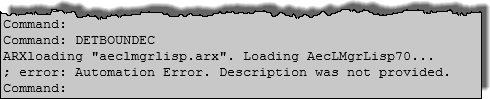
AutoCAD: Automation Error. Description was not provided.

While I am certain that the error message in the title above will be issued for any number of reasons, I came across this when some users were trying to run a custom AutoLISP® routine that draws an area to be enlarged "box". Until yesterday, I was unable to reproduce the issue on my own computer, making it hard to figure out what was causing the error. Having determined at least one cause for this error message, I decided to document it here.

Finally running into the error myself yesterday, I was able to use the VisualLisp IDE to step through the main routine and determine that the crash was occuring during a call to a subroutine that returns a list of the Layer Keys in the current Layer Key Style. While I would like to think of myself as a relatively competent AutoLISP programmer, there are definitely areas where my skills and experience are thin; error handling routines are one such area. At the time I wrote that subroutine, I was not aware that the out-of-the-box (AecLayerKeyList) function (defined in AecLMgrLISP.arx) would do what I wanted from my subroutine (I was likely confused by the description of the routine as returning "a resbuf list of strings"), so I wrote my own, with no error handling. It turns out that at some point in the past, our office standard Layer Key Style ended up with a corrupt Layer Key. Attempting to read the name of this layer key results in the "undescribed" error. Both the (AecLayerKeyList) function and the Style Manager are capable of handling the error. Style Manager just omits the corrupt Layer Key; the (AecLayerKeyList) function includes the name as an empty string (""), which is not valid input for the name of a Layer Key.

Overwriting the "bad" Layer Key Style with one that does not have the corrupt Layer Key resolves the error and allows the area-to-be-enlarged routine to run. That was much easier than adding error handling to my routine, and should probably be done in any event.

November 23, 2014

ACA 2015: Cannot invoke (command) from *error* without...

Several people in the Autodesk AutoCAD® Architecture General Discussion Group have experienced problems when trying to run AutoLISP routines in which an error condition is encountered. Instead of the usual, often helpful, error message at the Command: line, this error shows up, instead:
Cannot invoke (command) from *error* without prior call to (*push-error-using-command*).

This appears to happen even when the first thing you do in a drawing is evaluate a LISP expression with an error, for example, by typing (alert 1) at the Command: prompt and then pressing ENTER.

If you were hoping for a more informative error message, so you could try to work out what went wrong, you will want to reset the initial definition of the *error* function to what it should be:
(defun *error* (msg) (princ "error: ") (princ msg) (princ))

One way to get this code loaded into every drawing you open would be to include it in your ACADDOC.lsp file (if you have one; if not, you can create one). This file needs to be somewhere in the AutoCAD Search path (and be the first on of that name found); if your firm has a standard ACADDOC.lsp file and you do not have rights to edit it, you may want to discuss having this code added to it with your CAD Manager. You will also want to have the folder in which the ACADDOC.lsp is placed be designated as a Trusted Path (Files tab of Options dialog) if you have SECURELOAD set to 1 to avoid the nag dialog about loading it. If SECURELOAD is set to 2, you have to have the ACADDOC.lsp file in a Trusted Path folder, or the file will not load at all.

There are other ways to get this code loaded with each file, if using ACADDOC.lsp does not work for your situation. The easiest would be to open Notepad and paste the code above into it, then save the file with a name of your choosing and a LSP extension, again, to a folder that has been designated as a Trusted Path. Then add that file to your Startup Suite in the Load/Unload Applications dialog (APPLOAD command).

I am not sure why the *error* function is not properly initialized, but running the above code when opening a drawing or creating a new drawing will resolve this issue and give you the expected error messages.

September 30, 2013

ActiveX and AutoLISP Programming Tip 2

In this previous post, I provided the code for getting the AecArchBaseApplication object. This object provides access to a number of values that I previously obtained through DXF access to the dictionaries (which is no longer exposed). Assuming that you have saved the AecArchBaseApplication object to a variable called archBaseApp, the following code examples show how to obtain the noted objects and values:
;;; To get values from the currently active document, you need to get that
;;; object, which is stored in a property of the AecArchBaseApplication:
(setq docActive (vlax-get-property appAecArchBase 'ActiveDocument))

;;; With the active document in hand, you can get the AecArchBase 
;;; Preferences object:
(setq objAecArchBasePref
        (vlax-get-property docActive-AecArchBase 'Preferences)
)

;;; The AecArchBase Preferences object contains a number of values of
;;; interest, including those shown below.

;;; Model "tab" drawing scale:
(vlax-get-property objAecArchBasePref 'DatabaseScale)

;;; The auto-import Layer Standards/Layer Key Style file:
(vlax-get-property objAecArchBasePref 'LayerFile)

;;; The currently active Layer Key Style:
(vlax-get-property objAecArchBasePref 'LayerStandard)
;;; Yes, the property is named "LayerStandard", but the value stored
;;; is the current Layer Key Style, not the associated Layer Standard.

;;; The annotation plot size:
(vlax-get-property objAecArchBasePref 'TextHeight)

;;; Whether or not a DIMSCALE override is automatically created
;;; when you change scales and the current dimension style is not
;;; annnotative:
(vlax-get-property objAecArchBasePref 'CreateDimscaleOverride)

;;; The various units settings can be accessed through the Preferences
;;; object also, such as the current linear unit:
(vlax-get-property objAecArchBasePref 'LinearUnit)

Use vlax-dump-object on the AecArchBase Preferences object to see a list of all of the properties stored there.

In some cases, the values returned will be self-explanatory, such as the DatabaseScale, which is the scale factor associated with the current scale. For example, if the current model tab drawing scale is set to 1/4" = 1'-0", the DatabaseScale value will be 48.0. For items that are yes/no toggles, such as CreateDimscaleOverride, the value will be an integer. No (or false, or unchecked) is 0 (zero). Yes (or true, or checked) could be any other number, but is generally (always?) returned as -1 (negative one). Other values, such as LinearUnit, will seem more cryptic. If the current linear unit is set to "Inch", LinearUnit will return an integer value of 31. Properties such as LinearUnit return "enumerated values" (or "enums"), where each possible value is assigned a numeric value which may or may not have anything to do with the meaning it represents. The AutoCAD® Architecture Developer Help has a section that lists several of the enums used by AutoCAD Architecture and AutoCAD. Expand the AEC Base Automation Reference node and then the Enums node below that, and select the AecBuiltInUnit Enum for a listing of the various values and their meaning. As indicated in the image below, 31 is the enum for Inch.

July 16, 2013

ActiveX and AutoLISP Programming Tip 1

When trying to make use of the AutoCAD® ActiveX® access to the object model through the AutoLISP® "VL" commands, the vlax-dump-object function will likely become one of your best friends. The Help sections on the object model are certainly useful, but as you test bits of code to verify that they work, I have found the vlax-dump-object function invaluable in helping me to understand exactly what properties are available for a given object.

For example, I was trying to update a subroutine I had written some years back that returned certain information about the current AutoCAD® Architecture drawing, including the drawing scale. This was before drawing scale had been added as a feature to the "vanilla" AutoCAD® software, and I had been using a DXF "hack" to get the current drawing scale from (namedobjdict) > AEC_VARS dictionary > AEC_VARS_DWG_SETUP dictionary > 40 group. In more recent releases, the CANNOSCALEVALUE system variable will give you the current annotation scale in a drawing. When Model Space is active in a Layout Viewport, however, it is possible for the viewport scale (magnification relative to Paper Space, which is presumed to be 1:1 when plotted) to be different from the annotation scale, and I wanted to be able to report both scales. By using the vlax-dump-object function in the Visual LISP Console for the ActivePViewport object, I was able to quickly see which properties changed when I changed settings in the drawing, which helped me to understand that the inverse of the CustomScale property of the ActivePViewport object would give me the scale factor for the viewport magnification, and also allow me to sidestep dealing with the enum values reported by the StandardScale (Viewport magnification) and StandardScale2 (viewport annotation scale).

Another thing that I was able to discover by using the vlax-dump-object function was that the Paper Space Viewport does not report all of the properties that other Layout Viewports report. For example, a Layout Viewport object scaled to 1/4" = 1'-0", saved to variable objVpA, might have the following properties, which can be examined using vlax-dump-object:
_$ (vlax-dump-object objVpA)
; IAcadPViewport: IAcadPViewport Interface
; Property values:
;   Application (RO) = #
;   ArcSmoothness = 10000
;   Center = (17.8157 11.25 0.0)
;   Clipped (RO) = 0
;   CustomScale = 0.0208333
;   Direction = (0.0 0.0 6889.41)
;   DisplayLocked = 0
;   Document (RO) = #
;   GridOn = -1
;   Handle (RO) = "E84"
;   HasExtensionDictionary (RO) = -1
;   HasSheetView (RO) = 0
;   Height = 22.5
;   Hyperlinks (RO) = #
;   LabelBlockId = 0
;   LabelBlockId32 = 0
;   Layer = "G-Anno-Nplt-N"
;   LayerPropertyOverrides (RO) = 0
;   LensLength = 50.0
;   Linetype = "ByLayer"
;   LinetypeScale = 1.0
;   Lineweight = -1
;   Material = "ByLayer"
;   ModelView = nil
;   ObjectID (RO) = 60
;   ObjectID32 (RO) = 60
;   ObjectName (RO) = "AcDbViewport"
;   OwnerID (RO) = 61
;   OwnerID32 (RO) = 61
;   PlotStyleName = "ByLayer"
;   ShadePlot = 0
;   SheetView = nil
;   SnapBasePoint = (0.0 0.0)
;   SnapOn = 0
;   SnapRotationAngle = 0.0
;   StandardScale = 26
;   StandardScale2 = 7
;   Target = (1690.27 1160.54 0.0)
;   TrueColor = #
;   TwistAngle = 0.0
;   UCSIconAtOrigin = -1
;   UCSIconOn = -1
;   UCSPerViewport = -1
;   ViewportOn = -1
;   Visible = -1
;   VisualStyle = 1
;   Width = 35.3685


For the Paper Space Viewport object for that same Layout, vlax-dump-object returns the following:
_$ (vlax-dump-object objVpA)
; IAcadPViewport: IAcadPViewport Interface
; Property values:
;   Application (RO) = #
;   ArcSmoothness = 10000
;   Center = (24.3525 19.3312 0.0)
;   Clipped (RO) = 0
;   CustomScale = 1.0
;   Direction = (0.0 0.0 1.0)
;   DisplayLocked = 0
;   Document (RO) = #
;   GridOn = 0
;   Handle (RO) = "1FB"
;   HasExtensionDictionary (RO) = 0
;   HasSheetView (RO) = 0
;   Height = 36.5272
;   Hyperlinks (RO) = #
;   LabelBlockId = Exception occurred
;   LabelBlockId32 = ; error: Exception occurred: 0xC0000005 (Access Violation)
; warning: unwind skipped on exception
; error: Exception occurred: 0xC0000005 (Access Violation)


The LabelBlockID property is apparently unavailable for a Paper Space Viewport and the LabelBlockId32 property is not only unavailable, but trying to get the value causes an error that terminates the vlax-dump-object function. You can get to the properties that occur alphabetically after those two, one at a time, by using the vlax-get-property function. My routine presumes that Paper Space is plotted at 1:1 and any annotation would be scaled accordingly, so it sets the scale factors for both the viewport and the annotation at 1.0 without extracting any data from the drawing.

July 04, 2013

ActiveX Access to ACA/AMEP Drawing Settings

Updated 10/26/2019 to add support for versions 2015 through 2020 to the AECAPPVER code.

Since the 2010 releases, the AEC data stored in "dictionaries" has not been accessible through AutoLISP® entities/entity data, as it had been previously, through statements such as:
(cdr (assoc 350 (member '(3 . "AEC_VARS") (entget (namedobjdict)))))

I recently had the time and opportunity to investigate the use of the Visual LISP® functions to access the drawing data to access the data previously available through entity data.

The keys to getting ACA or AMEP data are understanding the Object Model, so that you know which Application holds the data of interest, a willingness to explore the Object Model, so you can find things that are exposed in locations other than what the object model suggests, and knowing that the "undocumented" vla-GetInterfaceObject function can be used to access those Applications and thereby the Object Model elements defined/stored therein.

The Help menu (in recent releases, in the upper right corner of the ACA/AMEP window, to the right of the InfoCenter and to the left of the Minimize/Maximize/Close buttons) has a choice called AutoCAD® Architecture Developer Help (in ACA) or AutoCAD® MEP Developer Help (in AMEP) that will open "local" Help files that explain the Object Models and available objects, methods and properties. AMEP users will need to see the ACA file, which can also be found under the installation directory (C:\Program Files\Autodesk\AutoCAD 2014\Help\adtauto.chm for my installation of the 2014 Building Design Suite). The AMEP file can also be found in the same folder (absauto.chm).

The loading of the Application objects is version-dependent, so the first step on my journey was to write a subroutine to return the proper string indicating the version of the release of ACA/AMEP running. Because many of the routines I am trying to update were written in the ADT 3.3/2004 time frame, I have chosen to include releases back to that time in this function. Unfortunately, I no longer have access to many of those releases to verify the AEC version numbers, so some of the return values in the routine are based on my best guess. If anyone is still running any of the the releases marked "verify", please do verify the values before trying to use the following code. And if you do, and are so inclined, I would appreciate a comment to this post either verifying that I guessed correctly or providing the right values. The subroutine initially tests to see if ACA or AMEP is running, and returns nil if aecarchbase.dbx or aecarchbasenn.dbx is not loaded, where nn is a two-digit number indicating a specific release from 2007 or earlier. If it is not loaded, then the subroutine ends with a warning to the user and returns nil, since there is little point looking for information that does not exist. The calling routine will have to determine how to handle the return of a nil value.
(defun AECAPPVER (            ; No arguments.
                   / ;_ Local variable:  
                     sacdvr   ; String stored in ACADVER system variable.
                 ) ;_ End arguments and local variables.
  (setq sacdvr (getvar "ACADVER"))
  ;; Return appropriate string:
  (cond                       ; cond A.
    ((not
       (or
         (member "aecarchbase.dbx" (arx))
         (member "aecarchbase50.dbx" (arx))
                              ; DBX file name not verified for 2007.
         (member "aecarchbase47.dbx" (arx))
         (member "aecarchbase45.dbx" (arx))
                              ; DBX file name not verified for 2005.
         (member "aecarchbase40.dbx" (arx))
                              ; DBX file name not verified for 2004.
         (member "aecarchbase30.dbx" (arx))
                              ; DBX file name not verified for 3.3.
       ) ;_ End or.
     ) ;_ End not.
      ;; ACA or AMEP is not running.
      (alert
        (strcat
          "Unsupported version of AutoCAD Architecture/MEP is running."
          "\nACADVER = "
          sacdvr
          "."
          "\n\nPlease notify the CAD/BIM IT Staff."
         ) ;_ End strcat.
      ) ;_ End alert.
      nil                     ; Return nil.
    ) ;_ End condition A.1.
    ((= "15.06" sacdvr)       ; ADT 3.3.
      ".3.0"                  ; VERIFY THIS RETURN STRING!
    ) ;_ End condition A.2.
    ((= "16.0" sacdvr)        ; ADT 2004.
      ".4.0"                  ; VERIFY THIS RETURN STRING!
    ) ;_ End condition A.3.
    ((= 16.1 (atof sacdvr))   ; ADT 2005.
      ".4.5"                  ; VERIFY THIS RETURN STRING!
    ) ;_ End condition A.4.
    ((= 16.2 (atof sacdvr))   ; ADT 2006.
      ".4.7"                  ; VERIFY THIS RETURN STRING!
    ) ;_ End condition A.5.
    ((= 17.0 (atof sacdvr))   ; ADT 2007.
      ".5.0"                  ; VERIFY THIS RETURN STRING!
    ) ;_ End condition A.6.
    ((= 17.1 (atof sacdvr))   ; ADT 2008.
      ".5.5"                  ; Return string.
    ) ;_ End condition A.7.
    ((= 17.2 (atof sacdvr))   ; ADT 2009.
      ".5.7"                  ; VERIFY THIS RETURN STRING!
    ) ;_ End condition A.8.
    ((= 18.0 (atof sacdvr))   ; ADT 2010.
      ".6.0"                  ; Return string.
    ) ;_ End condition A.9.
    ((= 18.1 (atof sacdvr))   ; ADT 2011.
      ".6.5"                  ; Return string.
    ) ;_ End condition A.10.
    ((= 18.2 (atof sacdvr))   ; ADT 2012.
      ".6.7"                  ; VERIFY THIS RETURN STRING!
    ) ;_ End condition A.11.
    ((= 19.0 (atof sacdvr))   ; ADT 2013.
      ".7.0"                  ; Return string.
    ) ;_ End condition A.12.
    ((= 19.1 (atof sacdvr))   ; ADT 2014.
      ".7.5"                  ; Return string.
    ) ;_ End condition A.13.
    ((= 20.0 (atof sacdvr))   ; ACA 2015.
      ".7.7"                  ; Return string.
    ) ;_ End condition A.14.
    ((= 20.1 (atof sacdvr))   ; ACA 2016.
      ".7.8"                  ; Return string.
    ) ;_ End condition A.14.
    ((= 21.0 (atof sacdvr))   ; ACA 2017.
      ".7.9"                  ; Return string.
    ) ;_ End condition A.15.
    ((= 22.0 (atof sacdvr))   ; ACA 2018.
      ".8.0"                  ; Return string.
    ) ;_ End condition A.15.
    ((= 23.0 (atof sacdvr))   ; ACA 2019.
      ".8.1"                  ; Return string.
    ) ;_ End condition A.16.
    ((= 23.1 (atof sacdvr))   ; ACA 2020.
      ".8.2"                  ; Return string.
    ) ;_ End condition A.17.
    (T                        ; Unsupported version running.
      (alert
       (strcat
         "Unsupported version of AutoCAD is running."
         "\nACADVER = " sacdvr "."
         "\n\nPlease notify the CAD/BIM IT Staff."
       ) ;_ End strcat.
     ) ;_ End alert.
     nil                       ; Return nil.
    ) ;_ End condition A.18.
  ) ;_ End cond A.
) ;_ End AECAPPVER.


With the subroutine above loaded, you can access the AecArchBaseApplication with this code
(vla-GetInterfaceObject 
  (vlax-get-acad-object) 
  (strcat "AecX.AecArchBaseApplication" (aecappver))
)

I will post more of my findings as I develop them.

Backstory Behind This Post:
Many years back, I did a lot of customization in AutoCAD® using AutoLISP, and was particularly pleased when the Visual LISP was introduced, as I made extensive use of the Visual LISP interactive development environment (VLIDE). While perhaps somewhat less slick that the equivalent setup for Visual Basic, it none the less made writing, testing and debugging a LISP routine or project much easier than using Notepad or a DOS text editor. I never really worked with the Visual LISP commands that were added to the AutoLISP arsenal at that time, however, and the time I had for customization dwindled with increasing project responsibilities and with attempting to master Architectural Desktop/AutoCAD Architecture.

I did, however, manage to find time to write a few customizations that accessed ACA settings (such as the drawing scale - before AutoCAD added that feature, Annotation Plot Size, current Layer Key Style, etc.) via DXF access to the dictionaries where that data was stored. There was little to no documentation on the structure of those dictionaries, but by working with what there was and trial and error, I was able to find the locations of various settings. My routines only read these values, and then acted accordingly; changing the values through ENTMOD was not supported and actively discouraged by Autodesk staffers. These routines stopped working in the 2010 release, because the dictionary contents were no longer exposed to DXF "hacking".

My on-the-job responsibilities shifted last year, as I moved out of the Project Architect roll and into the CAD/BIM Manager roll. I had reason to get back into customization, as I was looking for a way to expedite the processing of AutoCAD files exported from Revit, which tend to have a lot of entity-level settings (in particular, color) and which then tend not to work well for the disciplines that remain in CAD, as they are used to externally referencing the background drawings and controlling the appearance and plotting of the elements therein via layer settings. While working on that task, I had reason to become more familiar with the capabilities in the Visual LISP commands, and was reminded that I had a number of routines that no longer worked in versions more recent than 2009. I am using the rehabilitation of these routines as a pretext to become more familiar with the Visual LISP commands and the ACA Object Model, as I suspect that these skills will continue to have some relevance, at least until the day that our work is all Revit and no AutoCAD.

July 20, 2010

Insertion Point of an AEC Object in AutoLISP

If you have ever tried to use AutoLISP to automate a task involving an AEC Object, you may have found that the ENTGET function does not return as much information for an AEC Object as it does for an AutoCAD object. A question posted to the Autodesk AutoCAD Architecture Customization Discussion Group, asking how the insertion point of a Multi-View Block might be obtained in AutoLISP, prompted me to see if I could figure out how to do just that. I knew that the Visual LISP ActiveX (VLAX) functions allowed for direct access to an object's properties. Unfortunately, the amount of time I have available for fun* things like writing AutoLISP code shrank significantly right around the time that the VL/VLAX/VLR functions were introduced, so I have never become proficient with them. Since this task was fairly simple, I thought I would take a shot at it anyway.

Using the 2010 Help (the 2011 Help no longer appears to have the AutoCAD Architecture ActiveX Reference section), I was able to determine that Multi-View Blocks (as well as a number of other AEC Objects) have a Location property that holds the "insertion point" as a variant three-element array of doubles. That means that the value is not pre-declared as a specific data type ("variant") and that it contains an array of three, double-precision real numbers ("doubles"), which is what you would expect to describe a 3D point. From previous experince, however, I knew that I would not be able to just assign that property value to an AutoLISP variable and use it with AutoLISP functions. I scanned through the VLAX functions, and saw the VLAX-VARIANT-VALUE function, the description of which indicated that it would return the value of a variant. That sounded like it was just what I wanted, but I found that for a variant containing an array, the return value was a "safearray", and that was not the simple list of three real numbers I needed. Fortunately, I also found the VLAX-SAFEARRAY->LIST function, which converts a "safearray" to an AutoLISP-style list of three real numbers. This may be less "safe", but it is far more useful when using AutoLISP functions.

The following code is what I posted in reply in the Discussion Group. There is no error checking in the subroutine, so it will crash if the entity name passed belongs to an object of a type that does not have a Location property. I am assuming that the calling routine will only pass entity names of objects that have a Location property; if that is not possible, then the subroutine would need to verify that the passed entity name belongs to a appropriate object type before trying to obtain the Location property. If the subroutine tests for appropriate object type, then a special "alert" return value should be included to inform the calling routine that an inappropriate entity name was passed.
(defun AECINS (ename / ob ptarray ptins)
(setq ob (vlax-ename->vla-object ename))
(setq ptarray (vlax-get-property ob 'Location))
(setq ptins (vlax-safearray->list (vlax-variant-value ptarray)))
)


* - Yes, I suppose it is sad that I find writing AutoLISP code "fun".

October 21, 2008

Generating the Layers in a Layer Key Style

2/13/2019 - Updated to support ACA 2019.
11/2/2017 - Updated to support ACA 2018.
1/26/2017 - Updated to support ACA 2013 through 2017.
4/3/2011 - Updated to support ACA 2012.
1/27/2010 - Updated to support ACA 2010 & 2011.

Making use of the AecGenerateLayerKey function noted in this previous article, along with the code shown there for loading the appropriate ARX file (updated to work for versions from ADT 3.3 through ACD-A 2009), the AutoLISP code shown below will generate all of the layers associated with the Layer Keys in the current Layer Key Style.
(defun C:LKL (                           ; No arguments.
              / ;_ Local variables:
               flag                      ; Set to T if ARX loaded, nil otherwise.
               sacdvr                    ; String stored in ACADVER system variable.
             ) ;_ End arguments and local variables.
  (setq sacdvr (getvar "ACADVER")) ; Get AutoCAD version.
  ;; ARXload proper ARX function:
  (cond     ; cond A.
    ((= "15.06" sacdvr)
     ;; ARXload ADT3.3 function:
     (if (not (member "aeclayermanagerui30.arx" (arx)))
                                         ; If the ARX file is not currently loaded...
       (progn                            ; ...do the following:
         (prompt "\nARXloading \"aeclayermanagerui30.arx\". ")
                                         ; Display prompt noting file to be loaded.
         (if (arxload "aeclayermanagerui30.arx" nil)
                                         ; If ARX file loads successfully...
           (setq flag T)                        ; ...set flag to T.
           (prompt "\n; error: ARXLOAD failed")
                                         ; ...else display prompt and return nil.
         ) ;_ End if.
       ) ;_ End progn.
       (setq flag T)   ; ...else already loaded, set flag to T.
     ) ;_ End if.
    ) ;_ End condition A1.
    ((= "16.0" sacdvr)
     ;; ARXload ADT2004 function:
     (if (not (member "aeclmgrlisp40.arx" (arx)))
                                         ; If the ARX file is not currently loaded...
       (progn    ; ...do the following:
         (prompt "\nARXloading \"aeclmgrlisp40.arx\". ")
                                         ; Display prompt noting file to be loaded.
         (if (arxload "aeclmgrlisp40.arx" nil)
                                         ; If ARX file loads successfully...
           (setq flag T)  ; ...set flag to T.
           (prompt "\n; error: ARXLOAD failed")
                                         ; ...else display prompt and return nil.
         ) ;_ End if.
       ) ;_ End progn.
       (setq flag T)   ; ...else already loaded, set flag to T.
     ) ;_ End if.
    ) ;_ End condition A2.
    ((= 16.1 (atof sacdvr))
     ;; ARXload ADT2005 function:
     (if (not (member "aeclmgrlisp45.arx" (arx)))
                                         ; If the ARX file is not currently loaded...
       (progn    ; ...do the following:
         (prompt "\nARXloading \"aeclmgrlisp45.arx\". ")
                                         ; Display prompt noting file to be loaded.
         (if (arxload "aeclmgrlisp45.arx" nil)
                                         ; If ARX file loads successfully...
           (setq flag T)  ; ...set flag to T.
           (prompt "\n; error: ARXLOAD failed")
                                         ; ...else display prompt and return nil.
         ) ;_ End if.
       ) ;_ End progn.
       (setq flag T)   ; ...else already loaded, set flag to T.
     ) ;_ End if.
    ) ;_ End condition A3.
    ((= 16.2 (atof sacdvr))
     ;; ARXload ADT2006 function:
     (if (not (member "aeclmgrlisp47.arx" (arx)))
                                         ; If the ARX file is not currently loaded...
       (progn    ; ...do the following:
         (prompt "\nARXloading \"aeclmgrlisp47.arx\". ")
                                         ; Display prompt noting file to be loaded.
         (if (arxload "aeclmgrlisp47.arx" nil)
                                         ; If ARX file loads successfully...
           (setq flag T)  ; ...set flag to T.
           (prompt "\n; error: ARXLOAD failed")
                                         ; ...else display prompt and return nil.
         ) ;_ End if.
       ) ;_ End progn.
       (setq flag T)   ; ...else already loaded, set flag to T.
     ) ;_ End if.
    ) ;_ End condition A4.
    ((= 17.0 (atof sacdvr))
     ;; ARXload ADT2007 function:
     (if (not (member "aeclmgrlisp50.arx" (arx)))
                                         ; If the ARX file is not currently loaded...
       (progn    ; ...do the following:
         (prompt "\nARXloading \"aeclmgrlisp50.arx\". ")
                                         ; Display prompt noting file to be loaded.
         (if (arxload "aeclmgrlisp50.arx" nil)
                                         ; If ARX file loads successfully...
           (setq flag T)  ; ...set flag to T.
           (prompt "\n; error: ARXLOAD failed")
                                         ; ...else display prompt and return nil.
         ) ;_ End if.
       ) ;_ End progn.
       (setq flag T)                     ; ...else already loaded, set flag to T.
     ) ;_ End if.
    ) ;_ End condition A5.
    ((or (= 17.1 (atof sacdvr))
         (= 17.2 (atof sacdvr))
         (= 18.0 (atof sacdvr))
         (= 18.1 (atof sacdvr))
         (= 18.2 (atof sacdvr))
         (= 19.0 (atof sacdvr))
         (= 19.1 (atof sacdvr))
         (= 20.0 (atof sacdvr))
         (= 20.1 (atof sacdvr))
         (= 21.0 (atof sacdvr))
         (= 22.0 (atof sacdvr))
         (= 23.0 (atof sacdvr))
     ) ;_ End or.
     ;; ARXload ACA 2008, 2009, 2010, 2011, 2012, 2013, 2014, 2015, 2016, 2017, 2018 or 2019 function:
     (if (not (member "aeclmgrlisp.arx" (arx)))
                                         ; If the ARX file is not currently loaded...
       (progn    ; ...do the following:
         (prompt "\nARXloading \"aeclmgrlisp.arx\". ")
                                         ; Display prompt noting file to be loaded.
         (if (arxload "aeclmgrlisp.arx" nil)
                                         ; If ARX file loads successfully...
           (setq flag T)  ; ...set flag to T.
           (prompt "\n; error: ARXLOAD failed")
                                         ; ...else display prompt and return nil.
         ) ;_ End if.
       ) ;_ End progn.
       (setq flag T)   ; ...else already loaded, set flag to T.
     ) ;_ End if.
    ) ;_ End condition A6.
    (T
     (alert
       (strcat
         "Unsupported version of AutoCAD is running."
         "\nACADVER = "
         sacdvr
         "."
       ) ;_ End strcat.
     ) ;_ End alert.
     nil    ; Return nil.
    ) ;_ End condition A7.
  ) ;_ End cond A.
  (if flag
    (progn
      (mapcar 'AecGenerateLayerKey (AecLayerKeyList))
      (alert
        (strcat
          "\nLayers generated from current Layer Key Style. "
          "\nAny previously defined layers not overwritten! "
        ) ;_ End strcat.
      ) ;_ End prompt.
    ) ;_ End progn.
  ) ;_ End if.
  (prin1)
) ;_ End C:LKL.

Keep in mind that if the drawing file in which the LKL command function is run already has one or more layers with the same name as those defined in the current Layer Key Style, those layers will be left "as is" and will not have the layer attributes that are assigned in the Layer Key Style imposed upon them. If Layer Key Overrides are enabled, any Layer Key Overrides that are set will be applied to the generated layer names.

You can find a ZIP file with the "old" AutoLISP code (supports 3.3 through 2009 only) in this thread in the Autodesk AutoCAD® Architecture Discussion Group. 4/3/2011 - A ZIP file with version 1.2 that supports 3.3 through 2012 has been posted to that thread.

1/26/2017: An updated version that supports 3.3 through 2017 has been posted to this thread in the AutoCAD® Architecture Forum.
11/2/2017: An updated version that supports 2018 has been posted to that same thread, in my post dated 11/2/2017 at 6:54 pm United States Eastern Time Zone Daylight Savings Time (your local date and time may vary).
2/13/2019: An updated version that supports 2019 has been posted to that same thread, in my post dated 2/13/2019 at 9:14 pm United States Eastern Time Zone Standard Time (your local date and time may vary).