
Showing posts with label AUGI. Show all posts
Showing posts with label AUGI. Show all posts
July 13, 2019
AUGI Salary Survey, 2019
Help make the survey results more accurate by taking the survey and adding your information: 2019 AUGI Salary Survey.


January 10, 2011
Old AUGI Forums Restored
The pre-December 2010 AUGI Forums are back on line and ready to receive new posts, at http://forums.augi.com/. This is being described as a "beta", as there are still additional changes to be make to incorporate previous customizations into the more recent version of vBulletin that is now being used (where such customizations are deemed worthy of keeping, of course).
At this time, if you log into the main AUGI site and choose the Forums link, you will need to click on the http://forums.augi.com/ link to get to the new forums. The old ExpressionEngine forums are now read only, but can be viewed (separately) for reference. At some point in the future, those posts are to be merged into the vBulletin forums.
The archived AUGI Training Program (ATP) classes are also available again. You can navigate to the archived course material download pages from the Education link on the main AUGI site.
If you experience problems logging in to the site or accessing the old forums, try logging out of the site and deleting your AUGI cookies. When you then log in again, new cookies should be generated that will get you in to both sites.
At this time, if you log into the main AUGI site and choose the Forums link, you will need to click on the http://forums.augi.com/ link to get to the new forums. The old ExpressionEngine forums are now read only, but can be viewed (separately) for reference. At some point in the future, those posts are to be merged into the vBulletin forums.
The archived AUGI Training Program (ATP) classes are also available again. You can navigate to the archived course material download pages from the Education link on the main AUGI site.
If you experience problems logging in to the site or accessing the old forums, try logging out of the site and deleting your AUGI cookies. When you then log in again, new cookies should be generated that will get you in to both sites.
December 17, 2010
Old AUGI Forums to be Restored
As announced by incoming president David Harrington in this thread, the contents of the AUGI forums that were available prior to the change to the new website format are expected to be restored and that the forums section of the website will be using the "old" vBulletin software. This is welcome news on both counts, and will, I hope, result in the restoration of links to threads and ATP class materials made in other posts in this blog, which, as noted here, are currently not valid.
December 11, 2010
Previously Posted Links to AUGI Website and Forums
At the beginning of this month, AUGI (Autodesk User Group International) reorganinzed its website and forums. Due to an ongoing "situation" between AUGI and other entities that had been engaged to develop and host the site, all of the forum posts (and, apparently, archived ATP classes, as well) are not currently available.* So any previous links I have posted to threads or other information on the AUGI site are likely to be broken. It is unclear at this time if the old data will be restored, and, if it is, whether the old links will work.
* - See post #61 by Peter Jamtgaard and this blog article by Steve Stafford for two of the less inflamatory explanations of the current situation. Or, if you have the time and the attention span, read through all of the 367 (and counting) posts in this thread in the Revit Architecture Forum and try to figure out what is going on.
* - See post #61 by Peter Jamtgaard and this blog article by Steve Stafford for two of the less inflamatory explanations of the current situation. Or, if you have the time and the attention span, read through all of the 367 (and counting) posts in this thread in the Revit Architecture Forum and try to figure out what is going on.
June 09, 2006
Reminder - Formula Property Course Starts Monday

For those of you who are considering taking ATP121 but like to wait to the last possible moment to commit to something, that moment is here! The course starts Monday, June 12 - a mere three days from now. So go sign up for it, already, and I will "see" you in the course forum.
Read more about the class and how to join AUGI and/or sign up for the class in this previous post.
June 01, 2006
ADT/ABS Community Launch at AUGI
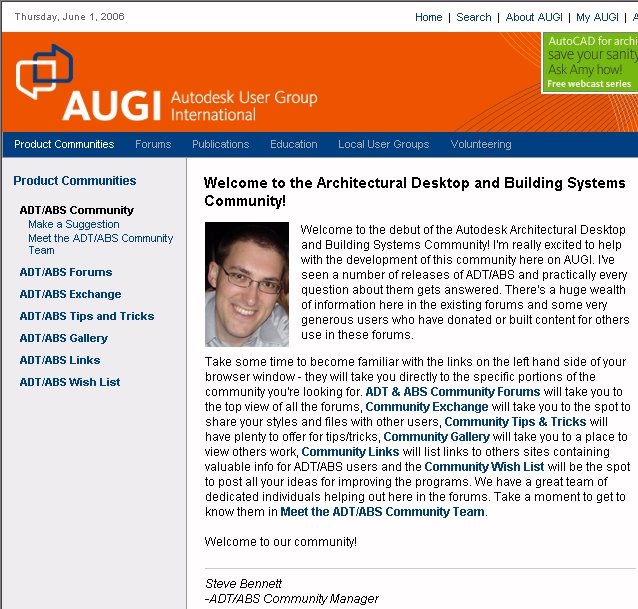
Today marks the launch of a new "community" at the AUGI Website. Joining the existing communities for AutoCAD and Revit is one for users of Autodesk Architectural Desktop and Autodesk Building Systems. The new community provides easy access to the ADT/ABS Forums - including the addition of three new Forums under the ADT/ABS General category: ADT/ABS Community Gallery, The Watering Hole and The WhiteBoard.
Check it out by logging in to AUGI, selecting the Product Communities link (on the left, just below the orange AUGI banner), then choosing the Architectural Desktop & Building Systems link in the left sash.
Not a member yet? It's free, and easy, just click here to get started.
May 22, 2006
Formula Properties Course
For anyone interested in learning more about the Formula property in ADT [and ABS], I will be teaching a course through the AUGI Training Program starting June 12, 2006, ATP121, "Formula Properties in Architectural Desktop".

The course is free, but does require membership in AUGI, which is also free. If you are not already a member, you can join AUGI at this site.
To sign up for the class, log in to the AUGI Website then choose the Education link under the main AUGI logo. In the left sash, choose the AUGI Training Program link and then choose the Current ATP Coruses link. Scroll down to the June 2006 courses, if necessary, and find the ATP121 course.
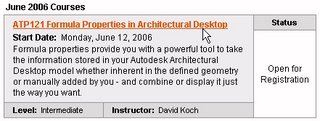
Click on the "ATP121 Formula Properties in Architectural Desktop" link, read the course description and then click on the Register button at the bottom of the window to register for the class.

On Monday, June 12, 2006, the course forum will open and the first segment of the course will be available for downloading, from your "My ATP" page. [Login to the AUGI Website, select the Education, AUGI Training Program and My ATP links in sequence.] I look forward to interacting with you in the class forum.

The course is free, but does require membership in AUGI, which is also free. If you are not already a member, you can join AUGI at this site.
To sign up for the class, log in to the AUGI Website then choose the Education link under the main AUGI logo. In the left sash, choose the AUGI Training Program link and then choose the Current ATP Coruses link. Scroll down to the June 2006 courses, if necessary, and find the ATP121 course.
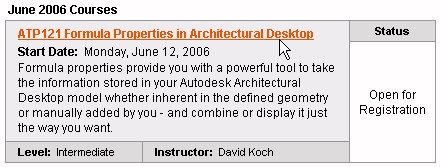
Click on the "ATP121 Formula Properties in Architectural Desktop" link, read the course description and then click on the Register button at the bottom of the window to register for the class.

On Monday, June 12, 2006, the course forum will open and the first segment of the course will be available for downloading, from your "My ATP" page. [Login to the AUGI Website, select the Education, AUGI Training Program and My ATP links in sequence.] I look forward to interacting with you in the class forum.
January 20, 2006
ADT Scheduling Class Materials Available

In April of 2005, I offered a class through the AUGI Training Program on Scheduling in ADT. The class materials were available for three months after the class concluded. AUGI has changed their archiving policy, and the materials are now available again, here. There is also a link to the class forum that was active while the class was being offered. You may want to look through it and see what discussion took place; there are also some additional example files scattered in the various threads and a "bonus" tutorial on Formula Properties in the "Formula Property Exercise" thread.
The website states that course materials will be available for three months, starting from six months after the conclusion of a course, but materials from January through June, 2005, are currently available. I do not know when older course materials will be removed, so if you are interested, download the materials soon. You do need to become a member of AUGI if you are not already a member in order to have access to the class materials, but membership is free.
If you join, be sure to take advantage of the class currently being offered by John Herridge on "Using Detail Components and Keynoting Effectively" - ATP103. You can register for the course by selecting the Current AUGI Training Program (ATP) Courses link on the AUGI Home page, or by selecting the Education link on the AUGI website, then selecting the AUGI Training Program Link at the left side, and then Current ATP Courses below that.
January 14, 2006
Richard Binning: Auto Tagging With VBA
There have been many requests on the Autodesk Architectural Desktop Discussion Groups to have tags "built-in" to various objects, rather than having to add a tag after creating the object. The Space Auto Generate Tool, which runs the _AecSpaceAutoGenerate command, does offer the option of automatically tagging the spaces created by that command, but for other objects, like doors, you need to add the tag as a separate step.

For the past three months, Richard Binning has been graciously sharing his extensive knowledge of VBA customization in a series of articles titled "VBA Shortcuts in ADT" in AUGI Hot News that explain how you can create a VBA customization that will automatically tag a door after it is added to your drawing. If this is something you have always wanted to be able to do, or have been waiting for just the right occasion to improve your VBA skills, then I would encourage you to take a look at these articles:
November, 2005 - Part 1
December, 2005 - Part 2
January, 2006 - Part 3
Thanks to Richard for your generosity, and here is hoping that I can find the time to work through these articles myself. If you have not done so already, you will need to become a member of AUGI to access the articles above, but membership is FREE, and provides access to all of the other services offered by AUGI. Sign up now by going here.

For the past three months, Richard Binning has been graciously sharing his extensive knowledge of VBA customization in a series of articles titled "VBA Shortcuts in ADT" in AUGI Hot News that explain how you can create a VBA customization that will automatically tag a door after it is added to your drawing. If this is something you have always wanted to be able to do, or have been waiting for just the right occasion to improve your VBA skills, then I would encourage you to take a look at these articles:
November, 2005 - Part 1
December, 2005 - Part 2
January, 2006 - Part 3
Thanks to Richard for your generosity, and here is hoping that I can find the time to work through these articles myself. If you have not done so already, you will need to become a member of AUGI to access the articles above, but membership is FREE, and provides access to all of the other services offered by AUGI. Sign up now by going here.
January 11, 2006
AUGI CAD Matinees

In addition to CAD Camps - single-day events designed to provide an Autodesk-University-like training experience, AUGI is also organizing a series of CAD "Matinees", half-day events to provide access to training while minimizing time away from the office.
There is currently one CAD Matinee listed, on February 2, 2006, in St Paul/Minneapolis, MN. Registration for that matinee is open.
January 01, 2006
AUGI CAD Camps - Early 2006
The dates and locations for the first AUGI CAD Camps have been posted at the CAD Camp website.
Omaha, Nebraska -- February 21
Seattle, Washington -- February 23
San Francisco Bay Area, California -- March 7
Houston, Texas -- March 9
Indianapolis, Indiana -- March 21
Registration for the Omaha event is currently open.
Omaha, Nebraska -- February 21
Seattle, Washington -- February 23
San Francisco Bay Area, California -- March 7
Houston, Texas -- March 9
Indianapolis, Indiana -- March 21
Registration for the Omaha event is currently open.
August 01, 2005
AUGI ATP Courses for August 2005
There are three classes this month, starting on August 8. Pre-registration has been re-instituted, so you can sign up for classes today. If you are already an AUGI member, login to the website, click on Education in the link bar below the logo and follow the ATP links at the left side. If you are not a member - now is a perfect time to join. Membership is free, as are the ATP courses.
ATP085 Access and AutoCAD: A Wedding Invitation
Category: AutoCAD
Course Title: ATP085 Access and AutoCAD
Level: Beginner
Instructor: Eric Wing
Course Start: Monday, August 8, 2005
Status: Open for Registration
It’s true! Access and AutoCAD were MADE for each other. There’s always been a reserved space in AutoCAD’s “heart” for Microsoft’s Access database. Bringing together the compatible components of these two programs, this course will start with creating an Access database (.mdb) with simple tables, queries, forms and reports. The student will then use this database as a data source in AutoCAD. You can put your brain on the shelf for this one because it’s easy!
ATP086 ObjectARX for Dummies
Category: Programming
Course Title: ATP086 ObjectARX for Dummies
Level: Advanced
Instructor: Fernando Malard
Course Start: Monday, August 8, 2005
Status: Open for Registration
Start to program easily with ObjectARX through simple and direct examples. The course will cover the minimum application overview with practical examples and most common procedures. If you always dreamed of creating an ObjectARX application but never had the courage to face the huge documentation, this class is perfect for you. This course will cover: ObjectARX Application basics, AutoCAD database basics, user interface basics, custom entities basics, custom objects basics and notification basics.
ATP087 Collaborating with AutoCAD and DWF Composer
Category: AutoCAD
Course Title: ATP087 AutoCAD's DWF Composer
Level: All Levels
Instructor: David Cohn
Course Start: Monday, August 8, 2005
Status: Open for Registration
Do you need to exchange drawings and collaborate with others who don’t use AutoCAD? Learn how to publish AutoCAD drawings as multi-sheet DWF files and then collaborate using Autodesk DWF Composer. This class covers creating DWF files; using DWF Composer to view, measure and mark up those DWF files; and then using AutoCAD’s Markup Set Manager to view and respond to those markups in a seamless collaboration process.
ATP085 Access and AutoCAD: A Wedding Invitation
Category: AutoCAD
Course Title: ATP085 Access and AutoCAD
Level: Beginner
Instructor: Eric Wing
Course Start: Monday, August 8, 2005
Status: Open for Registration
It’s true! Access and AutoCAD were MADE for each other. There’s always been a reserved space in AutoCAD’s “heart” for Microsoft’s Access database. Bringing together the compatible components of these two programs, this course will start with creating an Access database (.mdb) with simple tables, queries, forms and reports. The student will then use this database as a data source in AutoCAD. You can put your brain on the shelf for this one because it’s easy!
ATP086 ObjectARX for Dummies
Category: Programming
Course Title: ATP086 ObjectARX for Dummies
Level: Advanced
Instructor: Fernando Malard
Course Start: Monday, August 8, 2005
Status: Open for Registration
Start to program easily with ObjectARX through simple and direct examples. The course will cover the minimum application overview with practical examples and most common procedures. If you always dreamed of creating an ObjectARX application but never had the courage to face the huge documentation, this class is perfect for you. This course will cover: ObjectARX Application basics, AutoCAD database basics, user interface basics, custom entities basics, custom objects basics and notification basics.
ATP087 Collaborating with AutoCAD and DWF Composer
Category: AutoCAD
Course Title: ATP087 AutoCAD's DWF Composer
Level: All Levels
Instructor: David Cohn
Course Start: Monday, August 8, 2005
Status: Open for Registration
Do you need to exchange drawings and collaborate with others who don’t use AutoCAD? Learn how to publish AutoCAD drawings as multi-sheet DWF files and then collaborate using Autodesk DWF Composer. This class covers creating DWF files; using DWF Composer to view, measure and mark up those DWF files; and then using AutoCAD’s Markup Set Manager to view and respond to those markups in a seamless collaboration process.
July 14, 2005
AUGI CAD Camp Update

Registration is now open for the AUGI CAD Camps in Orange County, CA; Salt Lake City, UT; Columbus, OH; and Toronto, ON.
In addition to these camps noted in a previous blog article
August 16th: Orange County, CA USA (registration open)
August 23rd: Salt Lake City, UT USA (registration open)
August 30th: Toronto, ON Canada (registration open)
September 13th: Paramus, NJ USA (registration opens 7/17)
September 15th: Cleveland, OH USA (registration opens 7/17)
September 27th: Jacksonville, FL USA (registration opens 8/1)
September 29th: Boston, MA USA (registration opens 8/1)
the following dates have also been scheduled:
August 25th: Columbus, OH USA (registration open)
September 22nd: Kansas City, MO USA (registration opens 7/25)
October 18th: Birmingham, AL USA (registration opens 8/22)
October 25th: Denver, CO USA (registration opens 8/29)
May 26, 2005
More CAD Camp Dates
AUGI CAD Camp may be coming to a city near you. Read more at the CAD Camp Website.
June 7th: St Paul, MN USA (registration open)
August 16th: Orange County, CA USA
August 23rd: Salt Lake City, UT USA
August 30th: Toronto, ON Canada
September 13th: Paramus, NJ USA
September 15th: Cleveland, OH USA
September 27th: Jacksonville, FL USA
September 29th: Boston, MA USA
June 7th: St Paul, MN USA (registration open)
August 16th: Orange County, CA USA
August 23rd: Salt Lake City, UT USA
August 30th: Toronto, ON Canada
September 13th: Paramus, NJ USA
September 15th: Cleveland, OH USA
September 27th: Jacksonville, FL USA
September 29th: Boston, MA USA
May 12, 2005
AUGI ATP Courses for May 2005
There are two courses this month. Ed Jobe returns with the third installment of his ongoing series on VBA and Eric Wing is teaching a course on maintaining office standards, without becoming an ogre. These courses just started this week, and the downloads for the first segment are available. If you are already an AUGI member, login to the website, click on Education in the link bar below the logo and follow the ATP links at the left side. If you are not a member - now is a perfect time to join. Membership is free, as are the ATP courses.
ATP074
Focused VBA: Lesson 3 – Logic, Debugging and Error Handling
Category: Programming
Course Title: ATP074 VBA: Lesson 3
Level: Intermediate
Instructor: Ed Jobe
Course Start: Monday, May 9, 2005
This VBA continued Lesson 3, will introduce some intermediate subjects.
Segment 1 discusses some ideas on programming logic and describes the control structures that VBA has to implement decision-making and flow control.
Segment 2 will discuss what errors are and how to use the tools that come with VBA to prevent them and discover them when they do occur.
Segment 3 will discuss some methods for handling runtime errors.
ATP075
Maintaining CAD standards while avoiding a coup d’état
Category: AutoCAD
Course Title: ATP075 Maintaining CAD Standards
Level: Beginner
Instructor: Eric Wing
Course Start: Monday, May 9, 2005
Setting up office CAD standards is tricky business. Usually decisions that need to be made are done by committee, and take a painfully long time to establish. We all know this. Maintaining CAD standards, however, is the real challenge. How do we make sure people are using the company standards? How do we keep systems stable and running at peak performance regardless of who is driving? Well, organization is one. The other is knowing what tools are available, and how to use them to your advantage. This author doubles as a CAD / network manager, and a nice guy. Two titles that don’t belong in the same sentence.
I use a little organization and some really effective new tools (perhaps just a pinch of medication also) to remain as the CAD manager not the CAD Oppressor.
ATP074
Focused VBA: Lesson 3 – Logic, Debugging and Error Handling
Category: Programming
Course Title: ATP074 VBA: Lesson 3
Level: Intermediate
Instructor: Ed Jobe
Course Start: Monday, May 9, 2005
This VBA continued Lesson 3, will introduce some intermediate subjects.
Segment 1 discusses some ideas on programming logic and describes the control structures that VBA has to implement decision-making and flow control.
Segment 2 will discuss what errors are and how to use the tools that come with VBA to prevent them and discover them when they do occur.
Segment 3 will discuss some methods for handling runtime errors.
ATP075
Maintaining CAD standards while avoiding a coup d’état
Category: AutoCAD
Course Title: ATP075 Maintaining CAD Standards
Level: Beginner
Instructor: Eric Wing
Course Start: Monday, May 9, 2005
Setting up office CAD standards is tricky business. Usually decisions that need to be made are done by committee, and take a painfully long time to establish. We all know this. Maintaining CAD standards, however, is the real challenge. How do we make sure people are using the company standards? How do we keep systems stable and running at peak performance regardless of who is driving? Well, organization is one. The other is knowing what tools are available, and how to use them to your advantage. This author doubles as a CAD / network manager, and a nice guy. Two titles that don’t belong in the same sentence.
I use a little organization and some really effective new tools (perhaps just a pinch of medication also) to remain as the CAD manager not the CAD Oppressor.
April 09, 2005
April 2005 AUGI Training Program: ADT Scheduling Basics Class Offered
I am teaching a class, ATP071 Architectural Desktop's Scheduling Features, as part of the April 2005 offerings of the AUGI Training Program. There is no cost to participate in this class, other than having an Internet connection so that you can access the class materials and the dedicated forum for the class. You do need to become a member of AUGI to have access to the class, but that too is free. Check it all out at the AUGI website. Once you have joined [or, for current members, signed in] - click on the Education link in the menu bar below the logo graphics, then select AUGI Training Program > Current ATP Courses to find the current class offerings.
The class starts Monday, April 11, 2005, with Segment 1. Segments 2 and 3 will be made available on subsequent Mondays [April 18 and April 25, respectively]. There will be a dedicated Forum [discussion group] for the class, where you can post any questions that you have. I or other classmates will do our best to answer your questions in a timely fashion.
Here is a synopsis of the class content:
This course covers the components involved in scheduling in Autodesk® Architectural Desktop and the relationships between them:
No previous experience with Autodesk® Architectural Desktop’s scheduling feature is required, but general familiarity with the version of Autodesk® Architectural Desktop you are using will be helpful. At the end of the course, each student should know the scheduling components, how they relate to one another and should be able to create all of the components needed for a scheduling task.
The sample files and tutorials are based on Imperial units [feet and inches], with which I am most familiar, but the concepts should be able to be easily transferred to Metric files.
I hope to see you in the class forum! Should you be reading this post after the class has concluded, the class materials will still be available for downloading for several months after the conclusion of the course.
The class starts Monday, April 11, 2005, with Segment 1. Segments 2 and 3 will be made available on subsequent Mondays [April 18 and April 25, respectively]. There will be a dedicated Forum [discussion group] for the class, where you can post any questions that you have. I or other classmates will do our best to answer your questions in a timely fashion.
Here is a synopsis of the class content:
This course covers the components involved in scheduling in Autodesk® Architectural Desktop and the relationships between them:
- Property Data Formats
- Property Sets
- Schedule Tables
- Schedule Tags
No previous experience with Autodesk® Architectural Desktop’s scheduling feature is required, but general familiarity with the version of Autodesk® Architectural Desktop you are using will be helpful. At the end of the course, each student should know the scheduling components, how they relate to one another and should be able to create all of the components needed for a scheduling task.
The sample files and tutorials are based on Imperial units [feet and inches], with which I am most familiar, but the concepts should be able to be easily transferred to Metric files.
I hope to see you in the class forum! Should you be reading this post after the class has concluded, the class materials will still be available for downloading for several months after the conclusion of the course.
April 05, 2005
Additional AUGI CAD Camp Dates Announced
Additional dates for the next AUGI CAD Camps have been announced:
May 10, 2005 - Omaha, Nebraska (registration is now open)
May 26, 2005 - Baltimore, Maryland
June 7, 2005 - St. Paul, Minnesota
May 10, 2005 - Omaha, Nebraska (registration is now open)
May 26, 2005 - Baltimore, Maryland
June 7, 2005 - St. Paul, Minnesota
Subscribe to:
Posts (Atom)